
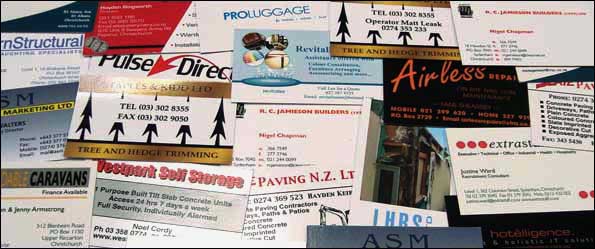
sdpGold Business Cards
For those who prefer a high quality business card, our sdpGold Business Cards are for you. An exceptional upgrade from our Standard Range, these cards are printed on a heavier, higher grade brilliant white board for an elite corporate presence.
- 💎 Premium Hybrid Coating: Vivid Super Gloss Finish on the Front with a clean Matte reverse
- ✍️ Functional Backing: A solid feel that makes it exceptionally Easy to Write on the Back
- 🪵 Heavy Weight Board: Premium, higher-grade 350gsm Heavy Matte White Board
- 🎨 Print Execution: Sharp commercial Black or radiant Full Colour layouts
- 📄 Sides Printed: Available to print cleanly on One Side or Both Sides
- 📦 Minimum Run Order: Flexible executive packages starting from 100 cards minimum
To order: click on a price below to email us an order for that option
sdpGold Business Cards Prices
| Qty |  |  |  |  |  |
| 100 | 119 | 134 | 149 | 97 | 107 |
| 250 | 169 | 184 | 199 | 127 | 137 |
| 500 | 239 | 254 | 269 | 187 | 207 |
| 750 | 249 | 274 | 299 | 197 | 217 |
| 1000 | 259 | 284 | 309 | 207 | 227 |
| 1500 | 339 | 364 | 389 | 277 | 307 |
| 2000 | 369 | 394 | 419 | 307 | 337 |
| 2500 | 469 | 504 | 539 | 387 | 427 |
| 3000 | 519 | 554 | 589 | 417 | 457 |
| 4000 | 669 | 714 | 759 | 557 | 607 |
| 5000 | 819 | 874 | 929 | 697 | 757 |
| Click on a price to email us an order for that option. | |||||
| Please Note: Prices Exclude GST | |||||
| Legend | |||||
| | | | | |
| Full Colour One Side | Full Colour Front; Black Back | Full Colour Both Sides | Black One Side | Black Both Sides | |
Download Master Print Layout Templates
Click the button below to download our complete master template suite. This single ZIP file contains print-ready guide layouts for Business Cards, Flyers, Postcards, Rack Cards, and Stationery.
🛠️ Supported Software Profiles Included:
• Modern Formats: Adobe PDF Print Guides, Illustrator (.AI), and InDesign (.INDD)
• Legacy Industry Formats: CorelDRAW (.CDR) and Aldus/Adobe FreeHand (.FH)
Designing on Canva? Follow These Steps
If you are using Canva to design your prints, verify your file export settings match these parameters to guarantee a crisp, un-cropped commercial print run:
- 1. File Type Selection: Open the “Share” tab, click “Download”, and change the File Type dropdown window menu to exactly PDF Print. Do not use standard PDF Standard, PNG, or JPG options.
- 2. Active Bleed Cushion: Tick the checkbox for “Crop marks and bleed”. This ensures your backgrounds stretch 2mm past the final trim edges so no raw white paper strips show up under our commercial cutters.
- 3. Colour Space Optimization: If you are using Canva Pro, change the Colour Profile dropdown selection from RGB over to CMYK (Best for professional printing). Free Canva accounts can leave it on RGB, and our automated prepress servers will re-align the ink densities safely.
What else would you like to know? Email us with your questions re sdpGold Business Cards
Compare all Business Cards products