
🔥 Loyalty Program & Specials Tier
Appointment Cards & Loyalty Program
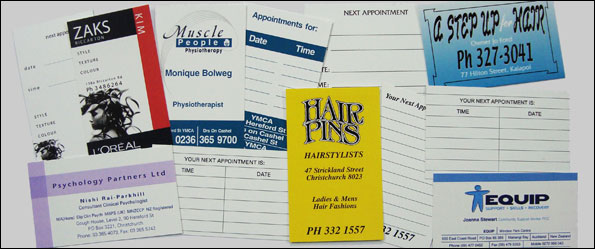
Through existing clients we have noticed that appointment cards are being ordered frequently. For this reason we are introducing an exclusive Loyalty Programme: Order your cards every 6 months (min. 250) and we will print the back in full colour at no extra charge, complete with a fresh 6-month voucher!
📞 Call 03 365 4516 To Order Now- 💡 Reason 1: Staff Combo Savings: Order for several staff members and we only charge you for the total volume pool! (e.g., 250 cards each for 3 people = 750 tier pricing, saving you heaps).
- 🎨 Reason 2: Free Prepress & Proofs: Zero setup charges, zero artwork fees, and zero hidden costs. We provide as many digital file proofs as it takes to get it looking just right.
- 🤝 Reason 3: Fast Personal Service: Printed on premium 300gsm Gloss Art card with full colour on both sides. Give us a call, we generate the artwork layout, and print upon your direct approval.
- 🚚 Reason 4: Free Courier Delivery: Can’t come in to pick them up from our facility? We will courier your cards out to your door completely free of charge!
👇 Scroll down to review our bulk quantity price matrices and click a link to order.

Canva
How to Export Print-Ready Artwork from Canva
Follow these crucial steps before exporting to ensure your design doesn’t get cut off during our same day commercial trimming process.
- 1. Turn on Bleeds in Canva: Inside your Canva project, click File > View settings and make sure “Show print bleed” is ticked. Ensure your background images stretch all the way to the outer border line.
- 2. Download with Correct Settings: Click the Share button in the top right corner, then tap Download.
- 3. Select “PDF Print” Profile: Change the File Type dropdown to “PDF Print” (do not choose standard PDF, PNG, or JPG as they degrade your printing quality).
- 4. Check the Bleed Boxes: Tick the box that says “Crop marks and bleed”. Leave the Color Profile set to CMYK if you have Canva Pro, or RGB if using the free tier (our press software will automatically convert it safely).
What else would you like to know? Email us with your questions re Appointment Cards
Compare all Specials products